SMS Opt-In & Consent
This page documents exactly how SPEDup Education collects SMS opt-in consent, the disclosure text shown to end users, and how users can opt out. It is provided as a public reference for A2P 10DLC campaign review.
1. Program Overview
SPEDup Education uses SMS text messaging for two transactional purposes only. We do not send marketing SMS of any kind.
- Two-Factor Authentication (2FA): When a user enables the "SMS Verification" toggle in Settings > Security, we send a one-time verification code via SMS each time they sign in.
- Admin Support Alerts: When a teacher designates another staff member as part of their Response Team, that staff member receives an SMS alert when the teacher initiates an admin support request from inside the SPEDup Education mobile app.
2. Opt-In Flow
Opt-in is collected during account onboarding on the SPEDup Education mobile app and the SPEDup Education web dashboard. Providing a phone number is optional; users can skip this step and still use the platform.
2.1 Step-by-Step Flow
- User creates an account (email + password, Google, or ClassLink SSO).
- User enters their school-provided join code.
- User is presented with a profile screen containing a phone number field.
- The phone number field is accompanied by the consent disclosure shown in Section 3 below.
- Consent is not pre-checked. The user must affirmatively tap "Send Verification Code" (mobile) or "Complete setup" (web) to provide their number and agree to receive SMS.
- The user may leave the phone field blank and continue without opting in.
3. Exact Consent Disclosure Text
SPEDup Education collects SMS opt-in on two surfaces, and each displays its own disclosure verbatim, adjacent to the phone number entry field. The two differ in the button that confirms consent and in how the two-factor clause is worded. Both are reproduced below exactly as they appear on screen.
3.1 Mobile App
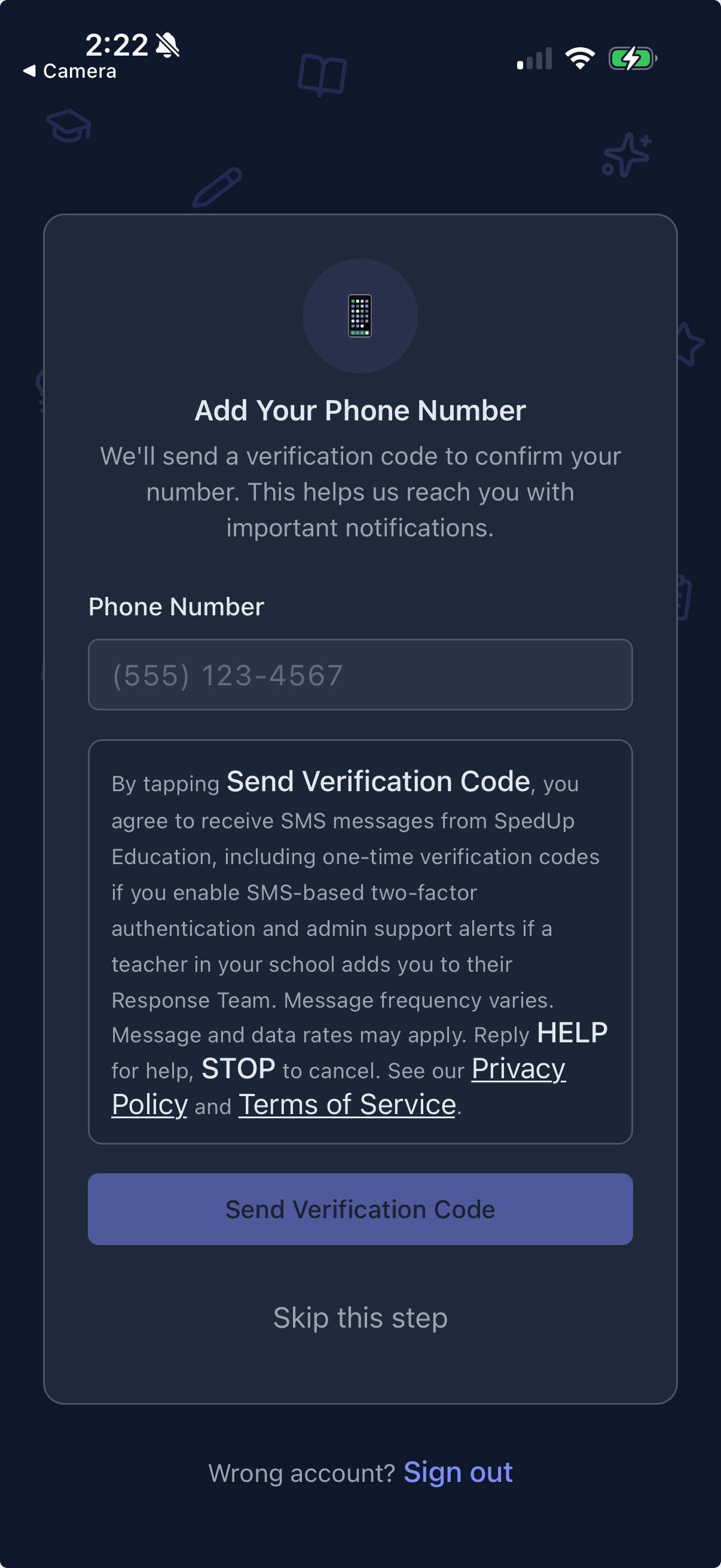
Displayed beneath the phone number field, above the "Send Verification Code" button.
By tapping Send Verification Code, you agree to receive SMS messages from SPEDup Education, including one-time verification codes if you enable SMS-based two-factor authentication and admin support alerts if a teacher in your school adds you to their Response Team. Message frequency varies. Message and data rates may apply. Reply HELP for help, STOP to cancel. See our Privacy Policy and Terms of Service.
3.2 Web Onboarding
Displayed beneath the phone number field, above the "Complete setup" button.
By tapping Complete setup, you agree to receive SMS messages from SPEDup Education, including one-time verification codes if you enable SMS-based 2FA and admin support alerts if a teacher in your school adds you to their Response Team. Message frequency varies. Message and data rates may apply. Reply HELP for help, STOP to cancel. See our Privacy Policy and Terms of Service.
Both identify the sender (SPEDup Education), the message types (two-factor verification codes and admin support alerts), message frequency (varies), rate disclosure (message and data rates may apply), and the HELP and STOP keywords.
4. Mobile App Screenshot
The screenshot below shows the phone number entry screen inside the SPEDup Education mobile app, with the consent disclosure visible above the "Send Verification Code" button.
5. Web Onboarding Form
The web onboarding form presents its own disclosure, reproduced verbatim in Section 3.2 above, directly beneath the phone number field. Web onboarding is available to authenticated users completing signup at /onboarding.
6. How Users Opt Out
Users may revoke consent and stop all SMS from SPEDup Education at any time by:
- Replying STOP to any SMS from SPEDup Education.
- Disabling the "SMS Verification" toggle in Settings > Security.
- Asking their Response Team owner to remove them from that team.
Users may reply HELP to any SMS to receive assistance information.
7. Data Handling
No mobile information will be shared with third parties or affiliates for marketing or promotional purposes. Text messaging originator opt-in data and consent will not be shared with any third parties. SMS messages are delivered through our messaging service provider (Twilio) solely to transmit the transactional messages described above on our behalf.
8. Related Policies
- Privacy Policy — see Section 11 (SMS Communications) for the full policy language.
- Terms of Service — see the SMS Communications section for messaging terms.
9. Contact
Questions about our SMS program can be sent to support@spedupeducation.com.